Master Custom Drinkware: The Shot Glass Template Bundle
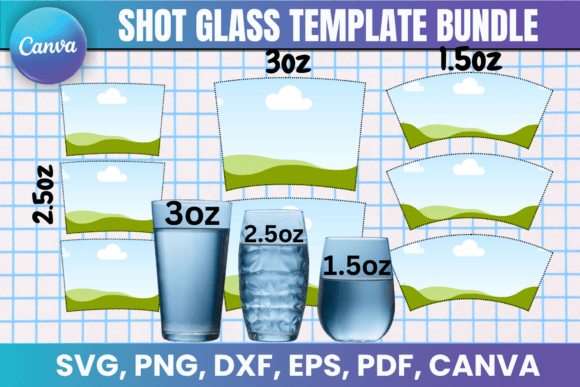
Creating professional-looking custom drinkware used to require expensive software subscriptions or outsourcing to graphic designers. The Shot Glass Canva Template Bundle changes that dynamic entirely, offering a practical solution for anyone looking to personalize shot glasses for events, gifts, or small business products. This bundle brings together precision-cut templates for 1.5 oz, 2.5 oz, and 3 oz shot glasses, making it accessible for crafters and entrepreneurs alike.
What Makes This Template Bundle Stand Out
At its core, this bundle provides pre-sized wrapper templates that eliminate the guesswork from shot glass customization. The Shot Glass Template Bundle includes multiple file formats—SVG for Cricut and Silhouette machines, PNG with transparent backgrounds for quick edits, DXF for Silhouette users, and PDF files formatted for standard 8.5"x11" paper. Each template is designed to wrap cleanly around the corresponding glass size, ensuring your designs align properly without awkward seams or misaligned edges.
The visual appeal comes from the precision engineering behind each file. Whether you're working with sublimation printing or vinyl decals, the templates maintain consistent proportions that respect the curved surface of each glass size. The 1.5 oz template accounts for the smaller circumference and shorter height, while the 3 oz version scales appropriately for larger glasses. This attention to dimensional accuracy means your finished products look polished rather than improvised.
Practical Applications Across Industries
Small business owners in the custom drinkware space will find the 3oz Shot Glass Wrapper templates particularly valuable. Bachelorette parties, corporate events, wedding favors, and holiday gifts all benefit from personalized shot glasses. The Canva template link included in the bundle allows for drag-and-drop customization, meaning you can adjust colors, add text, incorporate logos, and experiment with layouts without advanced design skills.
The Shot Glass SVG files work seamlessly with cutting machines, opening up possibilities for vinyl decals that adhere cleanly to glass surfaces. Cricut Design Space and Silhouette Studio both recognize these formats natively, so there's no conversion hassle or file corruption concerns. For sublimation enthusiasts, the templates provide accurate sizing that accounts for the shrinkage and stretching that occurs during the heat transfer process.
Marketing professionals and event planners can leverage the 1.5 Oz Shot Glass Template Canva version for branded merchandise. Restaurants, bars, breweries, and distilleries often need small-batch custom glassware for seasonal promotions or limited releases. Rather than ordering minimum quantities from manufacturers, businesses can produce exactly what they need in-house using these templates.
Design Flexibility and Software Compatibility
The bundle's inclusion of multiple formats reflects a practical understanding of how different creators actually work. Some prefer the precision of vector-based editing in Adobe Illustrator or Inkscape. Others want the simplicity of Canva's interface. The 2.5 Oz Shot Glass template accommodates both approaches, giving users the freedom to work in their preferred environment without sacrificing quality.
Canva's template link deserves special mention here. It removes technical barriers that often discourage beginners from attempting custom design projects. You can import your own graphics, experiment with typography, and preview your design on screen before committing to a physical print. The Shot Glass Wrapper template in Canva maintains its dimensional accuracy while remaining fully editable—colors, fonts, images, and layout elements can all be adjusted to match your vision.
For those working with SVG files in Cricut Design Space, the templates import with clean cut lines and proper layer organization. This matters when you're cutting intricate designs or working with multiple vinyl colors. The Shot Glass Canva Template Bundle files are optimized to avoid the common frustrations of poorly prepared SVG files—no overlapping paths, no unnecessary anchor points, and no hidden layers that complicate the cutting process.
Getting Professional Results
Quality starts with proper preparation. Before designing, measure your actual shot glasses to confirm they match the template sizes listed. While the templates are precision-designed, manufacturing variations in glassware can occasionally require minor adjustments. Print a test version on plain paper first and wrap it around your glass to verify the fit before committing to vinyl or sublimation materials.
Color management matters significantly for sublimation printing. The templates provide the correct dimensions, but achieving vibrant, accurate colors depends on your printer settings, ink quality, and sublimation paper choice. For vinyl applications, consider the glass's surface texture—smooth glass accepts vinyl differently than frosted or textured surfaces.
The licensing terms are straightforward and fair. You can use the templates to create and sell physical shot glasses without restriction. The digital template files themselves cannot be shared or resold, which protects the creator's work while giving you full commercial freedom with your finished products. This arrangement works well for small business owners who want to add custom drinkware to their product line without licensing complications.
Whether you're a hobbyist creating personalized gifts or an entrepreneur building a custom drinkware brand, this Shot Glass Template Bundle provides the technical foundation you need. The combination of multiple formats, accurate sizing, and easy customization makes it a practical addition to any crafter's toolkit or small business's design assets.