Specimen Slides 5: A Deep Dive into Canva Frame Templates
Understanding the Core of Specimen Slides 5
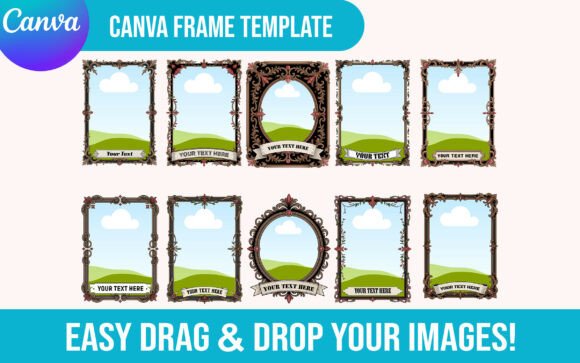
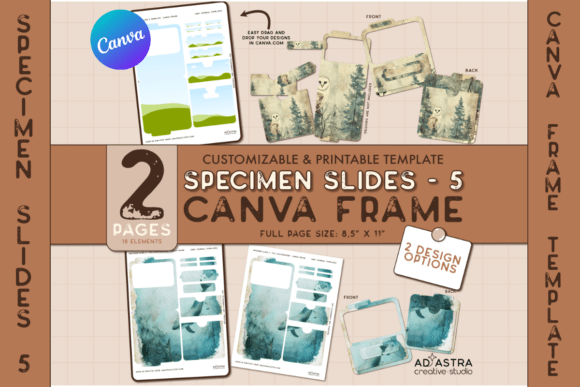
When you first open the Specimen Slides 5 Canva Template Set, you're not just getting a collection of frames; you're unlocking a structured yet flexible playground for your visual ideas. This particular set stands out because it bridges the gap between a rigid, pre-designed layout and total creative freedom. At its heart, it's built on the principle of modularity. The kit provides you with two distinct pages of customizable Canva Frames, each engineered to hold your own designs, textures, or illustrations. Think of these frames as sophisticated masks or containers. They define the boundaries of your final specimen slide, but what lives inside those boundaries is entirely up to you.
The visual personality of the Specimen Slides 5 templates is one of clean professionalism with a creative edge. They aren't overly ornate, which is a strategic advantage. Their appeal lies in their ability to act as a neutral-yet-styled vessel. Whether you're aiming for a vintage, botanical feel with sepia tones and hand-drawn elements, or a sleek, modern aesthetic with bold geometric patterns, the frames adapt. They provide structure—the slide's "bones"—while you provide the soul. This makes them incredibly versatile design assets, far removed from the one-note, single-purpose templates that often clutter the market.
Where These Templates Shine: Real-World Applications
The true value of a template set like Specimen Slides 5 is measured by its utility across different projects. For graphic designers and brand strategists, these slides are a secret weapon for creating cohesive brand identity presentations. Imagine showcasing a new logo design not on a blank white page, but within a series of professionally framed specimen slides that tell a story about the brand's texture, color palette, and personality. The ability to apply a cohesive design across all items in a sheet ensures visual consistency, which is paramount in professional branding.
For entrepreneurs and small business owners, the applications are equally practical. Use the templates to craft unique product packaging mockups or to design engaging social media graphics that stop the scroll. The frames lend an air of curated quality to your content, elevating simple product shots into editorial-style pieces. Bloggers and content creators will find them invaluable for designing Pinterest pins, Instagram carousels, or featured images that need to stand out in a crowded feed. The structured frames guide the viewer's eye, improving readability and engagement in a way that free-form designs sometimes struggle to achieve.
Crafters and hobbyists aren't left out either. The set is perfect for creating digital journaling elements, printable art for a home studio, or personalized gifts. The included PDF guide with a direct link to the Canva template demystifies the process, making it accessible even if you're just starting to explore modern typography and design tools. You don't need to be a seasoned professional to achieve professional-looking results; the template does the heavy lifting of providing a solid compositional foundation.
Maximizing Impact: Practical Guidance for Using the Set
To get the most out of the Specimen Slides 5 Canva Frame Template Set, start with a clear objective. Are you designing a series of social media posts? Creating assets for a client pitch? Building a digital product? Your goal will dictate how you customize the frames. If you're working on a brand identity project, consider using the frames to display different applications of a single logo or typeface. This demonstrates versatility and helps clients visualize the brand in action.
A key feature of this set is the creative option it offers: you can either apply one cohesive design across all the slides for a unified series or tailor each slide individually for a more eclectic, portfolio-style presentation. For marketing materials, cohesion is usually king. Use the same background texture, color overlay, or pattern across all frames to create a powerful, recognizable series. For a personal project or a creative portfolio, varying the interior designs can showcase your range and adaptability.
When it comes to the actual design work inside the frames, pay attention to font pairing and visual hierarchy. The frames themselves provide a level of hierarchy by containing your content, but the text and imagery within need their own internal structure. Choose a premium font for headlines that complements the style of the frame—perhaps a clean sans serif font for a modern look or a elegant serif font for something more classic. Ensure any body text is highly readable, especially if the slides will be viewed on mobile devices. Test your designs at different sizes to check for legibility.
Finally, remember that these are commercial-ready assets. The licensing allows for use in both personal and commercial projects, which is a significant advantage for freelancers and business owners. You're not just buying a one-time-use product; you're investing in a reusable design asset that can be adapted for countless future projects. The how-to guide included is your best friend here—take ten minutes to read it. It will save you hours of guesswork and help you leverage the full power of Canva's drag-and-drop interface with these frames, ensuring your final specimen slides are not just beautiful, but also perfectly executed.