Design Adorable Baby Apparel with This Canva Template
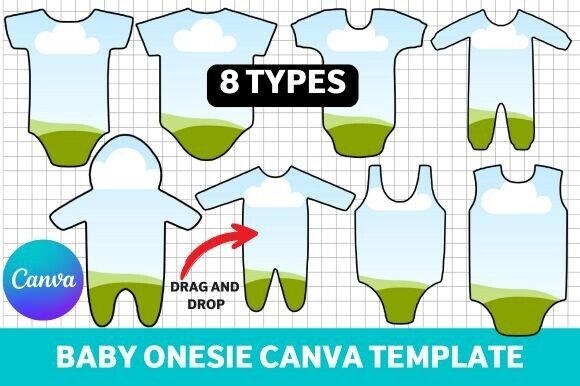
Starting a baby clothing line or creating a heartfelt gift doesn't require a graphic design degree. The Baby Onesie Canva Template provides a practical, professional foundation for anyone looking to design charming infant apparel. This set of eight unique layouts—featuring various onesie and romper styles—streamlines the creative process, allowing you to focus on your artwork rather than technical setup.
Understanding the Template's Structure and Style
At its core, this is a collection of design assets built for ease of use and visual consistency. Each template presents a clean, flat-lay perspective of a baby bodysuit, complete with accurate proportions for snap closures and neckline details. The visual personality is intentionally neutral, acting as a blank canvas. This minimalist approach ensures that your own graphics, typography, or illustrations remain the star of the show. The overall appeal lies in its professionalism; these templates mimic the mockup files used by established apparel brands, giving your project an immediate air of legitimacy.
The style is modern and versatile. You won't find distracting textures or pre-set color palettes here. Instead, the templates offer a straightforward vector-like appearance that works seamlessly with Canva's tools. Whether you're designing a vintage-inspired romper or a contemporary, graphic-heavy onesie, the template's clean lines support a wide range of aesthetics. It’s a practical piece of modern typography and layout design applied to product visualization.
Practical Applications for Entrepreneurs and Creatives
The true value of this Baby Onesie Canva Template emerges in its application across different projects. For print-on-demand shops, it eliminates the need to hire a photographer or purchase expensive mockup software. You can create entire product lines for your online store in an afternoon. Baby boutiques can use it to visualize custom orders for clients, presenting design options in a polished, professional format before production begins.
Beyond commercial use, it's an excellent tool for personal projects. Designing a one-of-a-kind gift for a baby shower becomes a simple drag-and-drop exercise. Bloggers and content creators in the parenting niche can generate unique, branded imagery for articles or social media posts without leaving Canva. The templates are optimized for sublimation printing, meaning the designs you create are ready for physical production, bridging the gap between digital concept and tangible product.
Integrating Design Elements for Maximum Impact
While the template provides the shape, your creative vision provides the soul. Pairing your artwork with the right font pairing is crucial for designs that include text, such as catchy phrases or personalized names. Consider how a playful script font or a sturdy sans serif font interacts with the onesie's silhouette. The template's simplicity allows for bold display font choices without visual clutter.
Think about the visual hierarchy on the garment itself. A large central graphic works well, but don't overlook the chest area or the back of the romper for secondary elements. The templates' accurate sizing helps you gauge how your design will translate to real fabric, considering factors like stretch and seam allowances. This foresight is invaluable for packaging design and brand identity if you're building a cohesive product line. Your onesie designs should feel like a natural extension of your logo, website, and other social media graphics.
Workflow Tips for a Polished Final Product
To get the most from these assets, start with a high-resolution canvas in Canva. Upload your graphics as PNG files with transparent backgrounds for easy layering. Use Canva's alignment tools to center your artwork precisely. Before finalizing, zoom in to check for any jagged edges or misaligned elements. If you're incorporating handwritten font styles or intricate serif font details, ensure they are legible at the intended print size—what looks clear on screen may become muddy when printed on textured cotton.
Finally, consider the end use. Will this design be screen-printed, embroidered, or digitally printed? Each method has different requirements for line thickness and color complexity. The Baby Onesie Canva Template gives you the perfect starting point, but your success depends on adapting your design to the production method. Export your final file in the format required by your printer, typically a high-resolution PNG or PDF, and you're ready to move from concept to creation.