Create Stunning Ebooks Effortlessly with a 135+ Page Canva Template
You have a wealth of knowledge to share, a business to grow, or a brand story to tell. An ebook is one of the most effective tools to do it—establishing your authority, generating leads, or delivering value to your audience. Yet, the design process often becomes a major roadblock. The blank page is intimidating, and professional design software feels complex and expensive. What if you could bypass the learning curve and produce a polished, professional ebook in a fraction of the time?
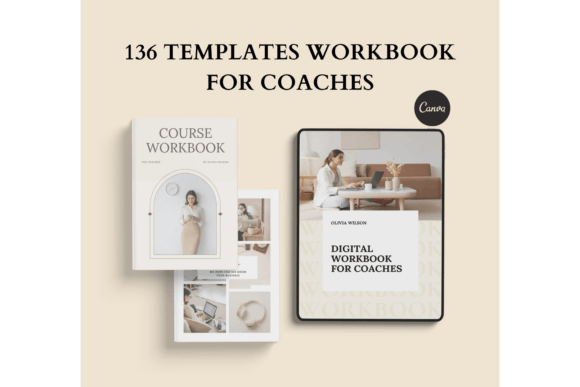
This is where a comprehensive, pre-designed template system changes everything. A 135+ page ebook template for Canva is more than just a collection of pages; it's a complete design framework. It provides the structure, visual consistency, and professional polish you need, all within an interface you can master in minutes. This isn't about replacing your creativity—it's about channeling it effectively, freeing you from the mechanics of layout so you can focus on your message.
Inside the 135+ Page Ebook Template: A Design Framework for Every Need
Think of this template as your design Swiss Army knife. It’s meticulously organized to cover every stage of your ebook creation, from the first impression to the final call-to-action. The sheer volume—over 135 pages—is a strength, offering a vast library of pre-built components you can mix and match. This eliminates the "design from scratch" anxiety and ensures visual harmony throughout your project.
The template suite is engineered for real-world application. It includes 10 distinct title pages, allowing you to set the perfect tone from the outset. A clear 7-page table of contents guides your reader, while dedicated about me, welcome, and team pages help build a personal connection. The core of your content is supported by 6 chapter titles and a remarkable 30 versatile content pages. These aren't generic layouts; they are designed for various types of information, from long-form text to visual storytelling with 11 gallery pages.
Beyond the narrative flow, the template includes powerful functional elements. Use the 7 charts and diagrams to visualize data, the 5 roadmap & steps pages to outline processes, and the 16 worksheets to make your ebook interactive. Monetize your offering seamlessly with the 4 price list pages, and drive engagement with the 9 resources & CTA pages. Even finishing touches like 5 testimonial pages, a do's & don't page, FAQ sections, and 5 thank you pages are included, providing a complete, end-to-end solution.
Customization Without Complexity: Your Brand, Your Rules
The true power of this 135+ page ebook and workbook template lies in its absolute flexibility. Every single element is customizable using a free Canva account. This is a game-changer for entrepreneurs, coaches, and creators who want full control over their brand identity without investing in complex software.
What does "fully editable" mean in practice? It means you can change text—not just the words, but the font, size, color, and style to match your brand guidelines. You can alter the background color on every page to create visual sections or align with your palette. Most importantly, you can move and scale elements. Drag a photo to a new position, resize a graphic, or reposition a text box. This level of control allows you to adapt the template’s modern typography and clean layouts to perfectly reflect your unique brand identity.
The template is provided in both A4 and US Letter sizes, making it ready for global digital distribution or professional printing. The design aesthetic strikes a balance between contemporary appeal and timeless professionalism. It uses a smart blend of serif and sans serif fonts for excellent readability, creating a clear visual hierarchy that guides the reader’s eye naturally. The style is clean, confident, and versatile—equally suited for a corporate report, a creative workbook, or a personal brand story.
Practical Applications: From Digital Product to Brand Asset
This template’s utility extends far beyond a simple PDF. Its structured design makes it an ideal starting point for a wide array of projects, ensuring brand consistency across all your touchpoints.
For digital product creators, it’s the fastest path to launching a professional lead magnet, online course companion, or paid ebook. The worksheet pages are perfect for actionable exercises, while the testimonial pages build social proof. Coaches and consultants can use it to develop client workbooks, program guides, or proposal documents that look impeccable.
In marketing and branding, the template becomes a core design asset. Use it to create detailed brand guidelines, media kits, or internal training manuals. The consistent use of modern typography and layout reinforces your brand’s professionalism. For bloggers and content creators, it’s a powerful tool for repurposing content into a comprehensive, shareable resource that grows your email list and establishes thought leadership.
Even for print applications, the template excels. The high-resolution, structured layouts are suitable for creating short-run printed books, workbooks for workshops, or elegant lookbooks. The inclusion of copyright and back cover pages shows attention to the details of traditional publishing.
Choosing and Using Your Template for Maximum Impact
With a resource this extensive, a strategic approach yields the best results. Start by planning your content structure. Review the table of contents options and map your chapters to the available content page layouts. Don’t feel compelled to use every single page; curate the sections that serve your story.
When customizing, prioritize brand consistency. Upload your brand fonts and colors to Canva first. Then, systematically apply them throughout the template. Pay close attention to readability. Ensure your body text has sufficient size and contrast against the background. Use the template’s inherent visual hierarchy—its bold headings, subheadings, and body text styles—to break up content and make it scannable.
Think about font pairing within the template. The pre-selected fonts work well together, but you can experiment. A good rule is to pair a distinctive display font for headings with a highly readable sans serif font for body text. Avoid using too many font styles; two or three is typically sufficient for a clean, professional look.
Finally, remember this is your foundation. The template provides the structure and polish, but your unique content, images, and voice are what will make it resonate. By leveraging this 135+ page ebook template for Canva, you remove the biggest barrier to professional publishing, allowing your expertise to take center stage. The result is not just an ebook, but a credible, engaging, and valuable brand asset that works for you long after it’s created.